Workshop
Run a whole software lifecycle with an agent, from idea to running code.
Six stages, one afternoon to set up, and then it is how you work. This page is the practical version: the exact commands, in order, with the places people get stuck marked out.
What this is, and what it is not
This page teaches one working method: Anthropic's AI-native software lifecycle, run with Matt Pocock's engineering skills doing the hands-on work inside each stage.
The process here was used to build a real project: Whiteboards, a planning canvas that went from an argument to running code through exactly these steps.
It is not a replacement for Anthropic's course. The course is aimed at engineering leaders changing how a whole organisation works, and it covers things one person cannot do alone: managed pull-request review, approval gates deployed by an IT admin, metric bands that trigger agents overnight. Do the course. This page is what you can run today, by yourself, in a repo you own.
Two buttons at the top of the page switch the instructions between the Claude Code CLI and the Claude desktop app. They are the same product with two front ends: same configuration folder, same slash commands, same plugins. Only installing and starting a session differ, so only a handful of paragraphs change when you flip it.
SDLC in ninety seconds
SDLC stands for software development lifecycle: the named steps a change goes through between somebody wanting it and it running for real. Most teams use six.
| Stage | The question it answers |
|---|---|
| Plan | What do we want, and why? |
| Design | What exactly should be built, under which constraints? |
| Build | Which files change, in what order? |
| Test | How do we know it works? |
| Deploy | How does it reach users, and who approved that? |
| Maintain | What broke, and what does that tell us to build next? |
Every team has a lifecycle whether or not anyone wrote it down. The stages are not strictly sequential - you loop back constantly - but each one has a moment where somebody hands something to somebody else, and those handoffs are where time goes.
What AI actually changes
Writing code got much faster. Deciding what to write, reviewing it, and approving it did not. So the bottleneck moved. An agent can produce a day of work in twenty minutes and then sit behind a queue of human steps that still take a week.
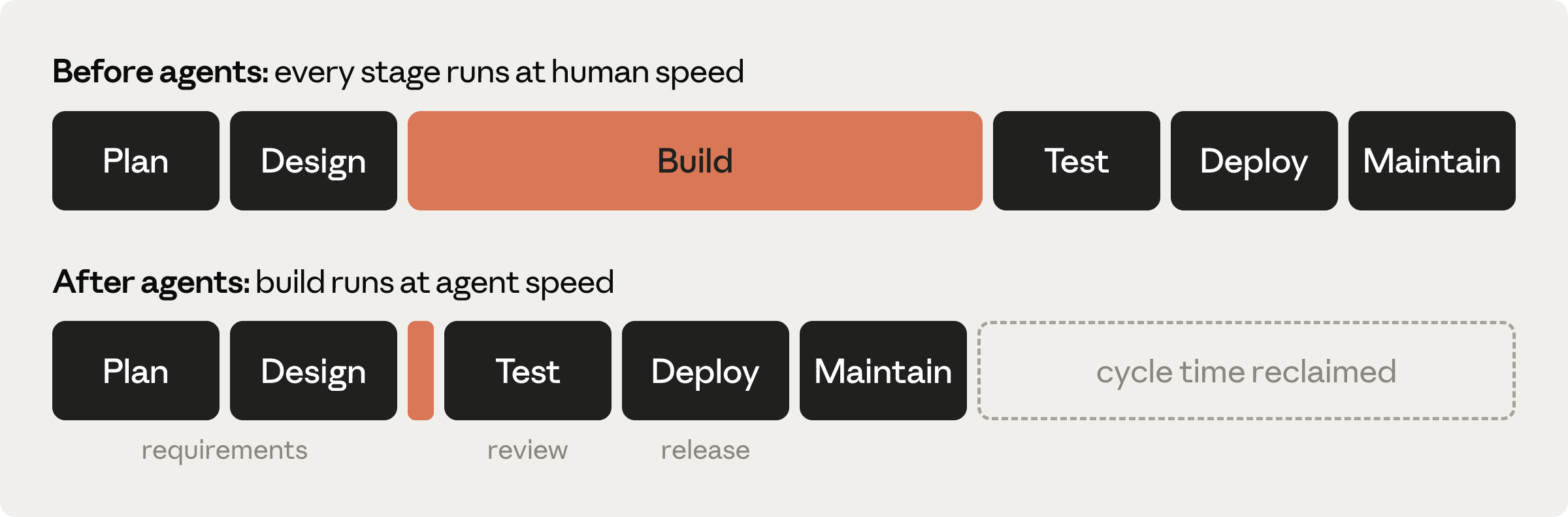
The AI-native answer is not a different set of stages. It is a rule about where decisions live:
A decision that exists only in a chat window is a decision you are about to lose. Context windows end. So each stage pushes what was settled into something durable - a committed document, a tracked issue, a test, a commit message - and the next stage starts from that rather than from your memory of the conversation.
How much of that chain you actually need depends on the size of the change, and that is the judgement this page keeps coming back to. A change that fits in one sitting needs almost none of it. A change that spans several sessions needs all of it, because every handoff between sessions is a place where understanding evaporates.
Some links in that chain are carried by a skill that reads the previous step's output. Others are carried by you, remembering to do them. This page marks which is which every time, because the two failure modes are different: a tool that does not fire is visible, and a habit you dropped is not.
The Anthropic course
Fourteen lessons, about an hour, free: academy.claude.com/courses/ai-native-sdlc-playbook.
Do it before or after this page, either order works. The course gives you the reasoning and the organisational plays; this page gives you the keystrokes. The course is deliberately tool-agnostic about the details, so where it describes a step without naming a command, this page names one.
Step one: get Claude Code, then add the skills
Two installs. The first is Claude Code itself - skip it if you already have it. The second is the skill set, which is in Claude Code's official plugin marketplace, so there is no marketplace to add and no files to copy.
1. Install Claude Code
If Claude Code is already running for you - either the app or the command line - you are done with this step. Go straight to installing the plugin below.
Install the command-line version. On macOS, Linux, or WSL:
curl -fsSL https://claude.ai/install.sh | bash
On Windows, in PowerShell:
irm https://claude.ai/install.ps1 | iex
Homebrew (brew install --cask claude-code) and WinGet
(winget install Anthropic.ClaudeCode) also work, but they do not
update themselves the way the installer above does. Check it landed, then
start it in any folder:
claude --version
claude
Sign in when it prompts you. You need a Pro, Max, Team, or Enterprise plan.
Download the desktop app and install it. It includes Claude Code, so there is nothing else to install.
- Download for macOS (one build for Intel and Apple Silicon)
- Download for Windows
Launch it and sign in. You need a Pro, Max, Team, or Enterprise plan.
The app has three tabs across the top. Everything on this page happens in the Code tab. Chat has no access to your files, so it cannot do any of this, and Cowork is a different way of working that this page does not cover.
One more thing worth knowing now: Ctrl + ` opens a terminal pane inside the app. You will barely need it, because you can ask Claude to run things for you, but it is there.
2. Install the skills plugin
Type this into the prompt, not into a shell. The official marketplace is already registered, so the install is one line:
/plugin install mattpocock-skills@claude-plugins-official
The desktop app also has a plugin browser if you would rather point and click:
press the + button beside the prompt box and choose Plugins.
Search for mattpocock-skills and install it at user scope
so it is available in every project.
Or browse first: run /plugin to open the plugin panel, go to the
Discover tab, and install from there. Choose user scope so it is
available in every project.
If the install reports Marketplace "claude-plugins-official" not
found - usually a blocked network on the first run - add it by hand and
retry:
/plugin marketplace add anthropics/claude-plugins-official
There is a second route, npx skills@latest add mattpocock/skills,
which copies editable skill files into your repo. Pick one.
Pocock's own README: installing both leaves you with every skill twice. The
two routes also produce different slash-command names, so instructions
written for one do not work on the other.
3. Check it worked, and learn the naming
Type /mattpocock-skills: into the prompt and stop. You should see
a list of about twenty-five skills appear. /plugin list is the
other way to check - the plugin should be there, enabled.
If the install said Run /reload-plugins to activate, or the
skills are not showing up in a session you already had open, run this:
/reload-plugins
Recent versions run that for you when you close the plugin panel, so most of
the time you will not need it. If it warns that reloading would make your
next message re-read the whole conversation, /reload-plugins
--force does it anyway. Restarting the app or the command line has the
same effect.
That prefix in the skill names is not optional:
Plugin skills are always namespaced. Every skill in this set is
/mattpocock-skills:<name>. The bare /grill-me
form you will see in blog posts belongs to the other install route. If a
command "does not exist", you almost certainly left the prefix off.
Step two: start a project (once per project)
Six things. By the end, an agent that opens this folder cold knows how to run it, how to check its own work, and where the planning files go. You will ask Claude to do nearly all of it - there is very little to type into a terminal.
1. Make a folder and open it in Claude
In the Code tab, choose the Local environment and click Select folder. In the picker that opens, make a new empty folder - "New Folder" on macOS, "New folder" on Windows - and choose it.
That folder is now your project. Everything on the rest of this page happens in a session opened on it, and Claude can read and write anything inside it.
Make an empty folder, move into it, and start Claude there:
mkdir my-project
cd my-project
claude
That folder is now your project. Claude can read and write anything inside it, and nothing outside it.
2. Ask Claude to set up git
Paste this into the prompt. There is no reason to do it by hand, and asking is the habit worth building:
Set this folder up as a new git repository: run git init, make one
empty first commit, and add a .gitignore suitable for a Node project.
Then create an empty folder called intent, which is where the planning
files will live. Tell me what you did.
The empty first commit is not ceremony. Several of the skills compare your work against a fixed earlier point in the history, and a repository with no commits has no earlier point to offer.
The intent folder is this page's own convention, not something
any skill looks for. It is somewhere to keep the short write-ups you make by
hand, in the same repository as the code they produced. The files the skills
themselves read and write - CONTEXT.md, docs/adr/,
and docs/agents/ - land elsewhere and are created for you.
3. Put it on GitHub
This needs GitHub's command-line tool, gh, once per machine.
Ask for it:
Install the GitHub CLI (gh) if it is not already installed, then tell
me whether I am signed in to it.
Signing in is the one thing Claude cannot do for you, because it asks questions and waits for answers. Run it yourself:
gh auth login
gh auth login
Answer GitHub.com, HTTPS, and log in through the browser. Then, back in the prompt:
Create a private GitHub repository for this project and push the
first commit to it.
4. Write CLAUDE.md, then cut it down
/init
This reads your project and writes a starting CLAUDE.md: a short
briefing that Claude reads at the start of every session in this folder. Now
do the part people skip. Cut it to one page. Anything stale
or obvious in there is being re-read forever, for nothing. Four headings are
enough:
- Commands - how to run it, test it, build it.
- Conventions - the rules that actually matter here.
- Architecture - the shape of the thing, in a paragraph.
- Things Claude gets wrong - starts empty, grows over time.
Adopt one working rule from day one: when Claude makes the same mistake twice, the correction goes into CLAUDE.md. That file is the only part of your setup that compounds.
5. Give Claude a way to check its own work
This is the step that decides how good everything after it is. An agent that can run your project and see for itself whether it worked will keep going until it is right. An agent that cannot will hand you code and a confident paragraph about it. You are giving it a way to be wrong in private and fix it, instead of in front of you.
What that means in practice is one command that answers pass or fail. In a
Node project it is npm test. Ask for it:
Set this project up so that "npm test" runs and reports pass or fail.
Add one trivial test that passes so I can see it working, then run it
and show me the output. Add the command to CLAUDE.md under Commands,
with an example of what a healthy run looks like.
Claude shows you the output of a test run and it says something passed. That is the whole check. If it errors instead, ask it to fix that before you move on - this is the one thing on the page worth being stubborn about, because stages 3 and 4 lean on it entirely.
6. Configure the skills, and commit
/mattpocock-skills:setup-matt-pocock-skills
It asks you where issues should live, then writes your answers into
docs/agents/issue-tracker.md,
docs/agents/domain.md,
docs/agents/triage-labels.md, and an
## Agent skills section in your CLAUDE.md. Those
four files are how every later skill knows where your work lives.
It will also offer GitLab, local markdown files, and a freeform option for
anything else. All of them work. This page assumes you picked
GitHub - you signed in to it a step ago, and later instructions
name real gh commands. If you choose differently, the shape of
every step stays the same but the places things get published change.
Skipping this step is not an option worth taking.
to-spec and to-tickets will refuse to run without
it, and code-review loses the ability to find what it is
supposed to be reviewing against.
Finally, put all of that in the history:
Commit everything we have set up so far and push it.
The six stages
Once per change, not once per project. Small change or large, the chain is the same; only how long you spend in each link differs.
Decide how big this change is before you type anything. Everything downstream branches on one question: does the work fit in a single conversation, or will it span several? If it fits, you skip the spec and the tickets entirely and go from the argument straight to the code. If it does not, you need both, because they are what survives the conversation ending.
You do not have to guess well. Guess small, and split later if the session starts straining - that costs you one extra step, not a rewrite.
If you need suggestions for a sample project, take a look at Pick a project at the bottom of this page. Six options, all sized to get you through one honest pass of the loop.
Plan - what do we want?
Start with an argument, not a document. This skill interviews you in numbered rounds, gives its own recommended answer to every question, and keeps going until your idea has no soft spots left.
/mattpocock-skills:grill-with-docs
It can write two things as it goes: CONTEXT.md, a glossary of
your project's vocabulary, and architecture decision records under
docs/adr/. Both are durable - they outlive this change and
every later session reads them. Both are also written
lazily: only when something actually qualifies. A session
that sharpens your glossary and produces no decision records is working
correctly, not failing.
This is the thing to understand about stage 1. The glossary and the decision records capture a thin slice of a long conversation. Everything else you worked out - why you rejected the other approach, what you agreed was out of scope, the edge case that changed your mind - exists only in that context window, and it goes when the window goes.
That is exactly the gap stage 2 exists to close, and it is why skipping stage 2 on a change that spans sessions hurts so much later.
So while it is fresh, write the result up as
intent/intent.md - by hand, or by asking for it. No skill
reads this file; it is for you, and for whoever asks in three months why
this was built:
# Intent: <name>
Author: <you>. Status: draft.

## Problem
## Proposed outcome
## Affected users and systems
## Constraints
## Open questions
Commit intent.md, CONTEXT.md and any decision
records together. Nothing downstream reads them - you are committing them
because they are the only durable record of a conversation that is about to
disappear, and because the glossary and the decision records genuinely do
get re-read by every later session.
grill-with-docs is a wrapper that loads two skills: the one
that interviews you, and the one that writes the glossary and the
decision records. The authors document a failure where the first loads
and the second does not - so you get a good interview and no paper trail
at all. They call it the most reported problem with this skill.
The tell is not the shape of the questions. You should see numbered rounds, each with a recommended answer, and you will see them either way. Instead, when the interview reaches something you would want written down, ask directly: "which skills did you load, and what have you written to disk so far?" If the answer names only the interviewing half, start the session again.
Design - what exactly gets built?
If what you just argued out fits in the session you are already in, go straight to stage 3 and build it. A spec earns its place only when the work will outlive this conversation. Writing one anyway costs you a synthesis step where detail can drift, and buys nothing.
Everything below is for the other case: work that will take several sessions.
Stay in the same conversation as the grilling and run:
/mattpocock-skills:to-spec
It will not interview you. The deciding already happened in stage 1; this skill only writes down what was settled, using your project's own vocabulary and respecting the decision records stage 1 produced. If it asserts something you do not remember agreeing to, that is a defect - say so and have it corrected.
A seam is the boundary your tests will observe behaviour
at - the public edge of the thing, rather than its insides. Before it
writes a word, to-spec proposes the seams this feature will
be tested at and waits for you to confirm them. It deliberately proposes
as few as it can, and prefers seams that already exist.
This is the highest-leverage question on the whole page. The testing skill in stage 4 refuses to write a test at a seam nobody agreed to, so whatever you settle here decides what your test suite is worth in six months.
The spec is published to your issue tracker as a single issue, not as a file in your repository. Because you answered GitHub at setup, that means a GitHub issue. Write its number down - you will need it in stage 3 and again in stage 5, and nothing else on this page will remind you.
Earlier drafts of this workflow, and the Anthropic course itself, talk
about committing a spec.md alongside your code. These skills
do not work that way. The spec lives on the tracker, and the only thing
in your repository pointing at it is whatever you write yourself.
So do write something: a line in intent/intent.md naming the
issue, and the issue number in the commit messages you make in stage 3.
That second habit is not cosmetic - it is the mechanism stage 5's review
uses to find the spec at all.
The next step, to-tickets, works best in the same window,
because the spec is then still in context and never has to be fetched
back from the tracker. Large specs can truncate on the way back. Run
them together.
What to actually read before moving on: the seams and the out of scope section. Those are the two places a wrong call is cheapest to catch now and most expensive to discover later. The rest is written for the agent, and reads that way.
Build - which files change, in what order?
implement commits straight to whatever branch you are
currently on. It does not create a branch, and it does not ask. If you
are on main when you run it, your work lands on
main.
Create and switch to a new branch for this work.
From here the page forks. Which half you follow depends on the size call you made before stage 1.
The small route: one session, straight to code
The work fits in the conversation you are already in, so the plan is still in front of you and nothing needs to survive a handoff. Ask for a plan in the chat, argue with it, then build it in the same window.
Plan mode is the honest way to do the arguing, because Claude explores and proposes while editing nothing.
# press Shift+Tab until the status line says: plan mode on
Shift + Tab cycles the permission mode. Keep pressing until
the status line reads plan mode on.
Open the permission-mode selector next to the send button and choose Plan. Claude will propose an approach without touching any files. The other modes in that menu are Manual (approve every change), Accept edits, Auto, and Bypass permissions, the last of which you have to turn on in settings first and should leave alone.
Ask for the files that change, the order of the work, and the tests that prove it. Then interrogate it: what could this break, which step is riskiest, what did you choose not to do and why. When you are satisfied, leave plan mode and run:
/mattpocock-skills:implement the plan we just agreed in this conversation
The skill describes its own input as "the spec or tickets", which pushes
the agent to go looking for a file that does not exist. The authors call
this out themselves: when the plan lives only in the thread, say so when
you invoke it. A bare /mattpocock-skills:implement can send
it hunting.
The long route: a spec, tickets, and one session each
You published a spec in stage 2 and it is still in this conversation. Slice it:
/mattpocock-skills:to-tickets
Each ticket it proposes is a vertical slice: a narrow but complete path through every layer, demoable on its own, sized to fit one fresh conversation. Each also declares which other tickets block it. It will show you the breakdown and ask whether the granularity and the blocking order are right before it publishes anything. Push back here - right-sizing tickets now is what stops a single session blowing up later.
The tickets are published to GitHub Issues. Then, one fresh conversation per ticket:
/clear
/mattpocock-skills:implement <owner>/<repo>#42
Work the tickets whose blockers are all closed, which for a straight chain just means top to bottom. Clearing between them is the point, not an optimisation: each ticket is self-contained precisely so the previous one's context is safe to throw away.
#42 on its own is resolved against whatever numbered list
the agent happens to see, which in a fresh session might be a to-do file
or a checklist rather than your tracker. It resolves confidently, so the
mistake is invisible until it has started building the wrong thing. Pass
owner/repo#42 or the full issue URL, and ask it to read the
title back to you before it starts.
implement ends at a commit. It does not close the issue, does
not tick the acceptance criteria, and does not act on the review findings
it generated along the way. You do all three.
On a chain of blocked tickets this matters more than it sounds: the next ticket counts as unblocked only when the ones before it are closed. Leave them open and the queue never advances.
Do not run several implement sessions side by side in the
same folder. They share one working directory, one index and one
HEAD, and the documented result is commits landing on the
wrong branch and stashes disappearing. If you want parallelism, you are
building it yourself with git worktrees.
Test - how do we know it works?
The rule is one line: always give Claude a way to verify its own work. Tests, a build, a screenshot it can look at. That is the test command you wrote during setup, and this stage is mostly the payoff for having written it.
Stage 4 is not a separate thing you run after stage 3.
implement is supposed to drive the testing skill as it builds,
one red-green slice at a time, typechecking as it goes and running the full
suite once at the end. When it works, you do not invoke anything here.
The testing skill refuses to write a test at a seam nobody agreed to -
that is its hard rule, and it is a good one. But nothing inside
implement does the agreeing. On the long route the seams
were settled in stage 2 and travel in with the spec. On the small route
nobody settled them, so unless they come up in the first exchange, the
precondition simply never fires and the run quietly becomes "write the
code".
So on the small route, say it yourself when you invoke it: name the boundary you want tests written against, or ask what it proposes before it starts.
Look for an explicit invocation of the testing skill in the trace, not just tests appearing in the diff at the end. Typechecks and single test files should run repeatedly during the work, with the full suite once near the finish. If tests only materialise in the final diff, they were written after the fact, which is the thing this whole stage exists to avoid.
You can also run the testing skill directly, when you have one concrete behaviour you want built test-first and no spec:
/mattpocock-skills:tdd
Fixing a bug
- Ask for the bug reproduced as a failing test.
- Run it. Confirm it fails for the reason you expect, not some other reason.
- Commit the test on its own.
- Then ask for the fix, without editing the test.
A test that existed before the fix, and that the agent could not rewrite, is the only real proof the bug is gone.
When a bug will not yield to that:
/mattpocock-skills:diagnosing-bugs
Its first phase is the whole skill: produce one command that goes red on this exact bug. Everything after that is easy.
Write-ups advertise "red-green-refactor". The skill itself says refactoring is not part of the loop - it belongs to review. Trying to refactor inside the loop is how you end up rewriting tests to match code you just changed, which defeats the point of having written them first.
Deploy - how does it ship, and who approved it?
Before you push, run the local pre-flight review. Do it in a fresh conversation, not the one that wrote the code - an agent reviewing its own work carries every assumption that produced it.
/mattpocock-skills:code-review main
main there is the point to compare against, not a file. It runs
two passes in parallel: does the code follow this repo's documented
standards, and does it do what the originating spec asked for.
The spec pass looks for the spec in a fixed order, and the first thing it
tries is issue references in your commit messages -
#42, Closes #42. That is why stage 3 tells you
to put the issue number in the commits. If it finds nothing, that half of
the review is skipped and the report says so.
If your commits do not mention the issue, pass the spec in by hand instead: give it the issue URL, or a path to a spec file. It will not look at your repository root, and it will not guess.
It is not a bug hunt and it has no security pass. The standards half checks conventions and design smells - duplicated logic, a type wanting to be born, a function reaching into another object's data. The spec half can flag a requirement that looks implemented wrongly, but only against what the spec said. Neither goes looking for null paths, race conditions, off-by-one errors, injection risks, authentication gaps, or secrets in logs.
For those, Claude Code's own built-in /code-review is the
one that hunts bugs in a diff. Running both is reasonable. Dropping the
review on the pull request because this one passed is not.
Every finding has to cite something - a documented rule, a named smell plus the code, or a line of the spec. Read that citation before acting: the report is assembled from two sub-agents and is not re-checked against the files, so a finding can point at the wrong place or overstate its case.
Also, do not run it in a loop until it comes back clean. It will not. Fixes create new surface and half the standards axis is judgement, so each pass finds something new. Act on the findings with a real rule behind them, then stop.
Then push the branch you made in stage 3 and open a pull request. The agent never pushes to main. That is the one non-negotiable rule of this stage and it costs nothing to keep.
If you are learning, stop here
The rest of this stage needs infrastructure you probably do not have and should not set up just to practise: an automated review agent in continuous integration, branch protection requiring a code owner, deployment credentials. A pull request on a branch of your own repo is a complete, honest version of this stage.
What the full version adds, when you have a team
-
A review policy at the repo root.
REVIEW.md, split into the passes you care about: bugs and logic errors; security; and compliance against whatever the work was specified from. Write it when you wire up the review agent, not before - on its own it is a file nothing reads. -
A review agent. Either the managed Code Review service, enabled by
an admin, or
claude-code-actionin your own pipeline. Only the second gives you the loop where tagging the agent on a review comment makes it push a fix. -
Hooks as gates. A
PreToolUsehook in.claude/settings.jsonruns before an action: exit 2 blocks it and the message goes to Claude, exit 0 allows it. A block should always explain itself and name the route to approval.
Findings never approve and never block on their own. A human code owner still approves the merge. An agent that can approve its own work has removed the gate, not automated it.
Maintain - what does reality tell us to build next?
This stage has one job: every incident and every missed metric becomes the next argument, and the loop restarts at stage 1. Write the diagnosis up the way stage 1 writes anything up, and you are already back at the start.
Nothing automates this link. No skill reads your pull request findings or your incident notes and turns them into the next piece of work. It is entirely a habit, which is why it is the one most often dropped.
Two skills earn a place in the habit:
/mattpocock-skills:improve-codebase-architecture
It surveys the codebase for modules worth deepening, reports, then grills you about whichever one you pick. What comes out re-enters at stage 1.
/mattpocock-skills:triage
Tickets that came out of to-tickets are published already
labelled ready for an agent, so there is nothing for triage to decide about
them. Point it at the issues other people filed.
The fully autonomous version of this stage - a script watching metrics, tiered responses at one, two and three standard deviations, an agent writing the next intent overnight - needs a metrics store and a production system. It is the last thing you build, not the first.
Six things that will bite you
Every one of these has cost somebody an afternoon. They are cheap to know and expensive to discover.
-
implementcommits to the branch you are standing on. It creates nothing and asks nothing. Start onmainand your work lands onmain. Make the branch before you invoke it, every single time. -
Nothing hands a plan from one session to the next. No skill here reads a planning file off disk. A plan works as an input only while it is still in the conversation, or once it has become tickets on your tracker. If you clear the session, the plan is gone - pass a ticket reference instead.
-
Two different things are called
/code-review. Claude Code ships its own, which hunts for bugs in a diff. Pocock's checks spec compliance and repo standards. They are not substitutes. The prefixed name/mattpocock-skills:code-reviewalways means the second one; the bare/code-reviewmeans the built-in. Know which you just invoked, and remember only the built-in does the bug pass. -
The grilling skill can interview you and write nothing. It is a wrapper around two skills, and the half that writes the glossary and the decision records can fail to load while the interview runs perfectly. The question shape will not tell you. Ask it what it has written to disk.
-
The review cannot find a spec you did not point it at. It looks for an issue number in your commit messages first, then a path you passed it, then files under
docs/,specs/or.scratch/. It never looks in your repository root. Put#42in the commits, or hand it the issue URL. -
Nothing closes your tickets or ticks your acceptance criteria.
implementstops at the commit. On a chain of tickets that blocks everything behind it, because the next ticket only counts as ready when its blockers are closed. Close them yourself as you go.
Pick a project and run the loop
Six options. Any of them will take you cleanly through stages 1 to 3 and give you something running locally. None of them needs a cloud account.
Every one of these was picked to have three properties, and if you invent your own it needs the same three: enough vocabulary that the grilling interview has something to argue about, one real rule engine that is worth testing carefully, and a natural stopping point you can reach in a sitting. A plain to-do list has none of them, which is why it makes a terrible practice project.
Whiteboards
Plan a feature epic on a draggable canvas. Cards for stories, grouped into epics, each epic with a colour, laid out in rows that reflow when you drag something across.
- Vocabulary to argue about
- epic, story, card, row, lane, colour assignment
- The rule engine
- layout: what moves when a card moves
- Stop when
- you can drag a card between epics and the rows resettle
Split the bill
A shared-expenses ledger for a trip or a flat. People pay for things, shares are uneven, and at the end it tells everyone the smallest set of transfers that settles up.
- Vocabulary to argue about
- participant, expense, share, exact split, settle-up, balance
- The rule engine
- minimising the number of transfers
- Stop when
- a four-person trip with uneven splits settles correctly
Spaced-repetition deck
Flashcards that come back at growing intervals. Grade a card and the scheduler decides when you see it next; get it wrong and it collapses back to the start.
- Vocabulary to argue about
- deck, card, grade, interval, ease, lapse, due, backlog
- The rule engine
- the scheduler - a pure function, beautiful to test
- Stop when
- a week of simulated reviews produces a sane due queue
Statement categoriser
Drop in a bank CSV, and user-written rules assign each line to a category. Then it shows the month against a budget and flags what is recurring.
- Vocabulary to argue about
- rule, match, category, merchant, recurring, envelope, uncategorised
- The rule engine
- the parser, and rule precedence when two rules match
- Stop when
- a messy real CSV imports and categorises with no manual fixing
Lending library
Track who has your books, board games, or tools. Each item moves through available, lent, overdue, returned - and the interesting part is which moves are legal.
- Vocabulary to argue about
- item, copy, loan, borrower, due date, overdue, reservation, renewal
- The rule engine
- the state machine, and what happens at the illegal transitions
- Stop when
- you can lend, renew, and chase an overdue item
Shift rota
Fill a week of shifts from a pool of people who each have availability, limits, and days they cannot work - while keeping the unpopular shifts shared out fairly over time.
- Vocabulary to argue about
- slot, shift, availability, blackout, fairness, coverage, swap
- The rule engine
- assignment: hard constraints first, then fairness
- Stop when
- a week fills with no conflicts and an explanation of each choice
How far to take it
Stop at something that runs on your machine. Deployment, monitoring and metric bands are real stages, but they are not the ones that change how you work, and practising them needs infrastructure that gets in the way of the lesson.
The three stages worth your full attention are Plan, Design and Build. That is where the artifact chain either forms or does not, and it is the difference between an agent that built the thing you meant and an agent that built something plausible. Run those three properly on one small project and you will not go back.
One-page cheat sheet
The "what lands" column says where the output of each step ends up. Some of it is written for you; some of it only exists if you write it.
| Stage | Command | What lands, and where |
|---|---|---|
| Setup (once) | /plugin install mattpocock-skills@claude-plugins-official/init/mattpocock-skills:setup-matt-pocock-skills |
CLAUDE.md, and docs/agents/ - issue-tracker.md, domain.md, triage-labels.md |
| 1. Plan | /mattpocock-skills:grill-with-docs |
CONTEXT.md and docs/adr/ when something qualifies. Your own write-up, by hand. |
| 2. Design multi-session work only |
/mattpocock-skills:to-spec |
One issue on your tracker. No file in the repo. |
| 3. Build | branch first, then small: /mattpocock-skills:implement the plan we just agreedlarge: /mattpocock-skills:to-tickets, then
/mattpocock-skills:implement owner/repo#42 per ticket |
Tickets on the tracker. Commits on your branch - put the issue number in them. |
| 4. Test | runs inside implementalone: /mattpocock-skills:tddstuck: /mattpocock-skills:diagnosing-bugs |
The tests, in the same commits as the code. |
| 5. Deploy | /mattpocock-skills:code-review main in a fresh session, then open a PR |
The PR and its findings. Close the tickets yourself. |
| 6. Maintain | /mattpocock-skills:improve-codebase-architecture/mattpocock-skills:triage |
Nothing automatic. Whatever you write down becomes stage 1 again. |
Two more worth knowing
/mattpocock-skills:ask-matt- a router, when you cannot remember which skill you want./mattpocock-skills:wait-what- when an explanation did not land, it re-pitches in plain English using your ownCONTEXT.mdvocabulary.